Search engine optimization is the work of making useful pages understandable and accessible to both people and search engines. It is not a switch that guarantees a first-page position, a certain number of clicks, or AdSense approval. This guide gives developers and site owners a repeatable workflow: check the technical foundation, publish pages that answer real needs, verify them with Google Search Console, and use observed results to choose improvements. Search systems and policies change, so use Google's current Search Essentials as the source for eligibility requirements.
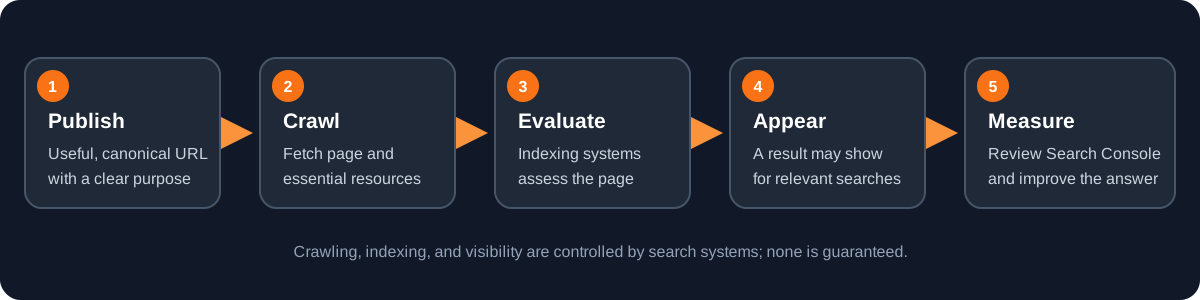
1. Make the site crawlable and indexable
Start with the exact public URL of every important page. A crawler must be able to request the page and its essential resources without authentication, blocked robots rules, or a broken server response. Use stable HTTPS URLs, return the correct status code, and choose one canonical URL for each page rather than publishing duplicate paths with conflicting content. A canonical link is a hint about the preferred URL; it does not force Google to select that version.
Check that pages intended for search are not accidentally marked noindex and that robots.txt is not blocking resources needed to understand them. Robots.txt controls crawling, not reliable removal from the index. Do not use it as a substitute for access control or a noindex directive. Keep private, staging, and authenticated content protected at the server boundary rather than relying on a hidden navigation link.
Create an XML sitemap containing canonical, indexable URLs that return successfully. Submit it in Search Console to make discovery and sitemap processing easier to monitor. A sitemap is a discovery aid, not a promise that every URL will be crawled or indexed. Remove redirects, error pages, duplicate variants, and noindex URLs from the sitemap. For a JavaScript-rendered application, test the actual rendered page and verify that the important text and links are present in the DOM Google can process.
<?xml version="1.0" encoding="UTF-8"?>
<urlset xmlns="http://www.sitemaps.org/schemas/sitemap/0.9">
  <url>
    <loc>https://example.com/guides/deployment</loc>
  </url>
  <url>
    <loc>https://example.com/guides/technical-seo</loc>
  </url>
</urlset>
Use your real preferred domain and canonical paths. Keep generated sitemap URLs synchronized with published routes, and serve the sitemap at a stable public location. Google's sitemap documentation explains supported formats and submission.
2. Give every page a clear purpose
Before writing, define the reader, their task, and what a successful answer lets them do. Review your site's Search Console queries, support questions, product usage, and competing results to find gaps; do not turn every spelling variation into a separate page. A focused guide should solve one coherent problem thoroughly, state assumptions, and explain when a recommendation does not apply. Original examples, accurate troubleshooting, and first-hand verification are more useful than repeating generic definitions.
Write a distinct, descriptive page title and a concise meta description that accurately represents the content. Use a single visible page heading that establishes the subject, then organize sections in a logical hierarchy. Titles and descriptions can help users recognize the result, but Google may generate a different title link or snippet. Avoid keyword stuffing, repetitive titles, hidden text, and claims that promise rankings. Read the official SEO Starter Guide for current guidance on titles, links, content, and search presentation.
<head>
  <title>Deploy a Small Web App with CI/CD | Example</title>
  <meta name="description"
        content="Plan hosting, pull-request checks, deployment, and post-launch verification for a small web application.">
  <link rel="canonical"
        href="https://example.com/guides/deploy-small-web-app">
</head>
Keep the title and description specific to the page and consistent with its visible content. The canonical URL should be absolute and point to the preferred, working URL. Frameworks often generate these tags from route metadata; inspect the rendered production HTML rather than assuming a client-only update is visible to crawlers. Continue with our HTML document structure for SEO and HTML SEO metadata guides for implementation details.
3. Build useful internal paths
Link related pages where a reader naturally needs the next explanation. Use descriptive anchor text that makes the destination clear, and ensure important pages can be reached through ordinary crawlable links rather than only search, scripts, or a sitemap. A small cluster of genuinely connected guides is better than placing the same long link list on every page. Review links when routes change and redirect retired URLs thoughtfully.
A guide about publishing a site might link to technical SEO, deployment, and relevant HTML references because those help readers complete adjacent tasks. Avoid inserting links that do not advance the current task. Internal links help people navigate and give crawlers paths to discover pages; they do not guarantee indexing or transfer a predictable ranking benefit.
4. Set up Google Search Console
- Add the appropriate property for your domain or URL prefix and complete Google's ownership verification. Use an account with the right access and protect verification credentials.
- Submit the sitemap URL if you maintain one, then inspect the reported processing status. Treat submission as a request for discovery, not an indexing guarantee.
- Use URL Inspection on a newly published canonical URL to check Google's indexed information and, when appropriate, request crawling. A request does not guarantee when or whether the page will appear.
- Review Page Indexing and enhancement reports for meaningful patterns. Open representative affected URLs and diagnose their actual status before changing site-wide rules.
- Use the Performance report to compare queries, pages, countries, devices, impressions, clicks, click-through rate (CTR), and average position over useful date ranges.
Search Console measures Google Search visibility and traffic; it is not a complete analytics system and does not report every query. Compare like-for-like date ranges, account for seasonality and site changes, and use page and query filters to understand context. Google's Search Console getting-started guide describes verification, sitemaps, indexing, and the Performance report.
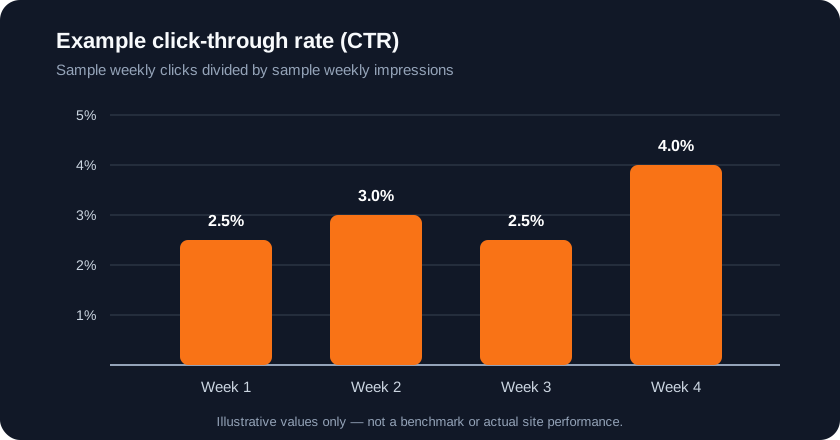
5. Turn impressions and clicks into a work queue
- Relevant impressions but few clicks: inspect the actual query and result appearance. Improve title clarity and snippet accuracy where the page genuinely answers that intent; do not promise a CTR increase.
- Queries that fit the page but are not answered clearly: add the missing explanation, steps, examples, or troubleshooting rather than inserting the query repeatedly.
- Important pages with little visibility: verify indexability, internal discovery paths, canonical selection, content usefulness, and whether the topic matches your audience.
- A sudden drop: compare dates, pages, queries, devices, and countries, then check deployments, redirects, indexing reports, and known search updates. Avoid making many unrelated edits before identifying a cause.
- High traffic but poor task completion: improve accuracy and usability; clicks alone do not prove that visitors found what they needed.
Keep a lightweight change log with the URL, observed issue, change made, date, and follow-up measurement. Search changes may take days or longer to appear and may not produce measurable gains. Prioritize user value and technical correctness over speculative ranking tactics.
6. Check performance and structured data responsibly
Test real pages on mobile and desktop. Reduce unnecessary JavaScript, optimize images, reserve layout space, and ensure links and controls work with keyboard and assistive technology. Core Web Vitals measure loading, responsiveness, and visual stability; use field data and lab tools to diagnose real bottlenecks. Good metrics support user experience, but they are not a guarantee of higher ranking. See Google's Core Web Vitals guidance and our HTML performance guide.
Add structured data only when the page content qualifies and the markup matches what users can see. Validate the output and monitor relevant Search Console reports. Structured data can make a page eligible for certain search features; it does not guarantee those features will be shown. Never use schema to claim ratings, prices, or facts that are absent from the page.
A sustainable SEO routine
At launch, verify canonical URLs, status codes, robots directives, sitemap generation, mobile rendering, and Search Console ownership. After publishing, inspect representative URLs and monitor indexing and query data. Review the site monthly or after substantial releases, choose a small number of evidence-based improvements, and remeasure after enough time to interpret the result. The goal is a technically accessible site with genuinely helpful pages—not a collection of SEO tags or a promise of traffic.